Social Connect Plugins for WordPress
Most of the users hate registrating, filling forms, waiting for confirmation e-mails… and we hate these things too, so we created some WordPress plugins, named Nextend Social Connect plugin! Now we want to share this very usable plugin with everyone, for free!

As you can see, our website’s social connect buttons are well working and well designed, and pertty cool. As we keep our philosophy, we do the best, we do what’s needed, and we do it all for you, so now we share our Nextend Social Connect WordPress plugins with you, FOR FREE!
Okay, I see the plugin and it’s very useful and nice designed, but…
Why choose I your stuff?
- If your visitors have a Facebook/Twitter/Google profile, they can register your site with a single click.
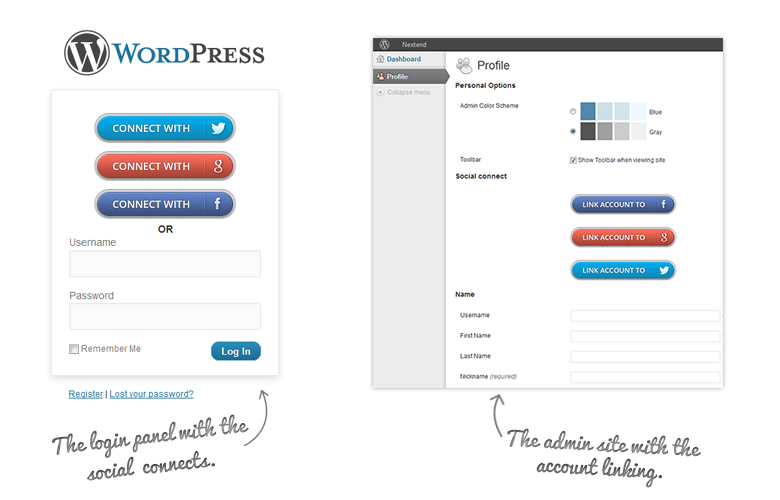
- The previously registered users can simply attach their existing Facebook/Twitter/Google profile to their account, so in the future, they can logging in with the one social connect button.
- The Social Connect plugin has multiple desings, so it fits all kind of websites smoothly and elegantly.
- Facebook profile pictures as avatars
- Very simple to use.
- Included social button generator.
- Fast and helpful support.
- Totally free
Create your social button for free!
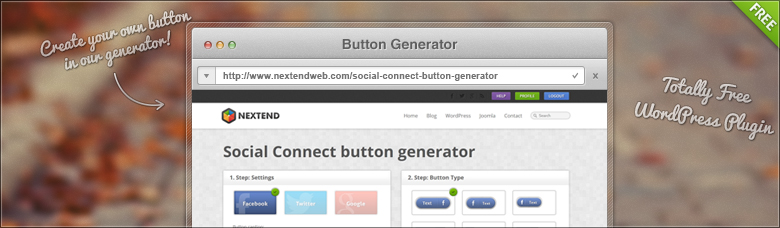
We made a very effective social button generator. With 4 simple click you can make your own Nextend Social Connect button! You will get, what you see! It’s simple amazing. If you ready, just copy the code where you want, and you done it!
It’s free and I will get support? Don’t kidding me!
We don’t have sense of humor, we just have expertise and professional calling. We made the Nextend Social Connect plugin for you, for free with support.
Where can I get Social Connect Plugins to boost up my Login?
You can install it in your WordPress plugins page. Just search for our name Nextend. If you have trouble with that here is the links to the Social Connect plugins:

So, I think you got the answers, if not, don’t hasitate, contact us!
I hope, you will choose us in the future too!
Notes
Better WP Security plugin limitations
- Disable “Filter Suspicious Query Strings” option
- Disable “Reduce comment spam” option
- Disable “Prevent long URL strings” option

107 thoughts on “Social Connect Plugins for WordPress”
What the hell are you doing your nextend facebook connect has lot of problem it stop my site now tell me what i do my website http://enter****gama.com/
you app send me some updates when i update your app it not showing my website
PLZ do something for it
Get back me on this my email adress is
ch*****@****il.com
I sent you an email to your email address. Please get in touch with me and I will figure out what could be the problem.
nice
The problem has been solved from version 1.4.3
Hi, when somebody log with his account (Google or Twitter) is it possible to have e-mail adress in the wordpress admin to use it after for mailing for example?
Thank’s
Regard’s,
Richard
Hi!
The Nextend Google Connect will automatically save the users email address to the user in your WordPress.
Nextend Facebook Connect: if the app can access to the user’s email address, the plugin will save into your database.
Nextend Twitter Connect: Twitter doesn’t give out the email addresses, so the plugin can’t query it. There are a lot of topic about this, but there is no solution to get twitter email adresses.
Great plugin.
I only had a minor issue: Redirect after login didn’t work, so I had to add the “redirect” parameter to new_fb_sign_button:
function new_fb_sign_button(){ global $new_fb_settings; return '<a href="'.new_fb_login_url().'$redirect='.$_GET['redirect_to'].'" rel="nofollow">'.$new_fb_settings['fb_login_button'].'</a>'; }Thank you for your participation. I will add this code to the next version of the plugin
Another problem I noticed is that the facebook-btn.css loads the Open Sans font over HTTP. For sites that use HTTPS, this generates a warning message. The simple solution would be to use protocol-independent syntax:
The browser will automatically chose http or https.
PS: Is the source code available on github or something? That would make it easier to contribute…
Thanks! I have added it each of the plugins. If you have account at wordpress.org, I can add you to the development team, which give writing access to the repositories for you. Please contact me in email for this
Can not login through facebook. It triggered fatal error.
Any Suggestion?
Please try it with version 1.4.11, which I think will solve the problem. Contact me again if it doesn’t.
Hi Roland,
Thanks for the quick response.
So where i can download the 1.4.11 version? Any download link please…:)
Thanks
Sorry, I forgot to commit the update. Now you can see it as an update on the WP backend: http://wordpress.org/extend/plugins/nextend-facebook-connect/changelog/
Hi,
Great plugins there, really love them. But i’m having a bit of trouble, the twitter and facebook connect plugins show double links on the login screen. Here the shot https://dl.dropbox.com/u/20885327/untitled.JPG
I’m using multisite feature plus theme my login. Are your connect plugins compatible with these features. Also testing the interface locally.
Thanks Jasdeep
Please contact me in email, because I will need admin account to check this problem.
Hi I got this error –> error_log: CSRF state token does not match one provided.
There was an error with the FB auth!
Can someone help?
Thanks,
Usually this happend, when you have some misconfiguration in the App in Facebook. Please contect me in email and we will find the solution
Hey Roland,
I’m having the same issue while on WPEngine.com’s hosting solution. It only started after we switched to them, but it is something I haven’t been able to fix.
Would you be able to help me?
Thanks !!
Please contact me on the support form and we will figure out what could be the problem.
Hello i have a problem, no button on the profile page to link existing account. Any idea?
Thks
Are you using some custom theme for profile settings page? Please contact me in email, because I will need admin account to check this problem.
Please write us a Support Ticket if you have any problem and we will figure out something. In the ticket please share detailed information, screenshot, URL or anything that can help.
In additional in this week we will release a new free plugin for WordPress so stay tuned.
Firstly, thanks for releasing this – it’s brilliant.
I just have one question – Is there a way for this plugin to register a top level account across a multi-site installation or are accounts confined to individual sites?
Sorry, but we haven’t tested it in multisite environment. I have never tried the multisite features of WordPress yet, but I will test it tomorrow and try to find solution for this.
Hi all,
We still encountered the following error in version 1.4.16 despite the author saying the error is fixed in 1.4.11
Fatal error: Cannot redeclare class FacebookApiException in /home/pontee/public_html/SuddenlyLOL.com/wp-content/plugins/nextend-facebook-connect/sdk/base_facebook.php on line 107
I sent you a beta code in email which should solve this problem. I’m wainting for your response!
That’s work! Thanks for your code and work!
Is there any way to avoid having to “Allow access” each time a user logs in. It’s a little annoying, and not “one-click”. I noticed it’s the same here as well, so it’s likely not something I’m doing.
As far as I know only the Twitter connect works like that way, because Twitter use oldal authentication API, which can’t be skipped(security reasons).
Now the Facebook social connect plugin supports profile picture as avatar function!
Hey Roland,
When people register to my website using their Facebook accounts it does not use their Facebook profile picture. It’s just the default mystery man picture. My site is : 2ezclan.net
Any ideas?
Ya Buddy
Is the google plugin broken in the beta version?
Are you experiencing problem with that? Please tell me what is wrong with the plugin. Thanks!
Getting this since I upgraded to the new 3.5rc1 release of WordPress:
I have added a fix for this. Please upgrade to version 1.4.21. I think that will fix this problem.
Sorry, I’m getting a different problem now (similar though).
Please try it with version 1.4.22. Also I will check tomorrow the Google verification problem too.
seems to be working now, thank you
I spent a little time on the Google verification and I was able to find the solution. Please try the version 1.4.23
Hi Roland,
Do users really need to authorize the Facebook or Google app every time they want to login? Wouldn’t it be much more user friendly if the website would auto recognize a returning visitor based on Facebook or Google login? Or at least the login process could skip the authorizing part if the user had already authorized.
This is exactly how I thought it should work as well.
That part would be cookie based, I’d imagine, yeah?
Hi guys! It’s a quite good idea so I promise that we will discuss it on Monday. And I hope we can add this feature soon. In addition thanks for the feedback!
The Facebook works in this way for me. Also I found some possibilities for improvement in Google and Twitter, so the 1.4.23 version both of the plugin works with a real one-click login.
Hi,
behind the last update i have got some problems with the plugin.
The following error massage is on my Page.
Warning: Missing argument 5 for new_fb_insert_avatar() in /var/www/web1116/html/blog/wp-content/plugins/nextend-facebook-connect/nextend-facebook-connect.php on line 292
Can anyone help?
PS:The best Connect Plugin for WordPress
Please try the following:
Open wp-content\plugins\nextend-facebook-connect\trunk\nextend-facebook-connect.php
Find this line
function new_fb_insert_avatar( $avatar, $id_or_email, $size, $default, $alt ) {and replace with this:
function new_fb_insert_avatar( $avatar = '', $id_or_email, $size = 96, $default = '', $alt = false ) {Please try it and write me the result. Thank you!
when I click on profile after login, it redirect me back to login page, how to fix that?
I found that when I click on profile button, it log me out that why it redirect me back to login page again T___T
Do you have any idea why this happen?
Note that I use SSL on profile and login page and HTTP on the other page, Is this related?
I’ve checked and found the problem is SSL, here the STR
1. Login via SSL page and it successfully redirect to non-SSL url
2. Click on profile link (This link is on SSL) than it log out automatically and redirect back to login page (SSL) and when click login again it redirect to login page again and again
It will logout automatically when go to profile page with SSL enabled
Do you have any idea how to fix this?
Please contact me in email with our support. I will need more details to find the problem.
cool
It’s awesome!
Can you tell me when you’re going to implement the user to immediately enter their email address, using the Twitter login?
I’m testing this with a dummy Twitter account and naturally, I’m going to receive any notifications since the Profile’s email address is a noemail.twitter.com one.
This is really important if a website is going to make maximum gain from notifications, signups, newsletters etc.
I notice there’s another WP Plugin that does enforce the email popup directly after the Twitter authentication.
This is a one-click login and register and this is why we not force the user with twitter to fill out the email address. I will try to figure out some easy solution for this. Please be patient.
Hey is there any plans for this to work with Buddypress? I ask because Buddypress plugins like Welcome Pack do not work with your plugin. When a user traditionally registers by filling out the registration form, Welcome Pack would automatically befriend that user and send them a default message. This most important because it shows the user that notifications exist and generates interaction from the moment the user registers. Let me know, thanks!
I tried it few weeks ago, but it worked with Buddypress. Can you contact with me on the support form with your site where I could check this problem?
I keep receiving this:
Twitter Error 1
I’ve already deactivated the plugin, reinstalled, and reactivated it. I also deleted my Twitter application and recreated it.
The only thing I can think of is since I first installed the Twitter plugin I was using a different directory than I am now. However, since I made the new directory I did update all my consumer keys and secrets. For example your Facebook and Google logins work fine.
So what’s going on?
Oh and btw when I tried to login using Twitter on this site I got:
Twitter Error 2
Please contact me on the support form. I should check your site and the Twitter app to find out what could be the problem. Thanks!
I think the Social Connect plugins are great! I installed them without any issues on my personal blog and as soon as I find the time, I plan on implementing them on my other sites too. Just popped over to say thanks for your hard work in developing the best Connect plugins I’ve come across so far.
Thank you for the good words. We really appreciate it!
Nice plugin…i got errors!
Please help!!!
Thanks!
Please check this, I think this will solve your problem: http://stackoverflow.com/questions/3020049/how-to-enable-curl-in-xampp
WoW! Thanks for the fast reply.
However, i got this error now
Then please contact me on the support staff. This is some kind of bug. Thanks you!
Very Nice and Clean plugin… i love it… thanks…
Im new to wordpress… is it possible to put the buttons in the same line ?
Thanks
Hi Admin… i got the error
(i use this plugin in wordpress site)
Hello,
I’ve got some problems with the Facebook Login – plugin.
If the users is already logged in with Facebook and clicks the “Login wit FB” button on the WP Login Screen – the site stops loading because of an “infinite loop” or in some cases throws “FacebookApiException Object : An active access token must be used to query information about the current user.” ? Any suggestions?
Please write us a Support Ticket if you have any problem and we will figure out something. Usually we support via email not in comment form. In the ticket please share detailed information, screenshot, URL or anything that can help.
i just want to know… there is a potability to disable the regular log in and to show just&only Facebook log in ?
Please check this article:
How to disable WordPress in-built Login
Pingback: How to disable WordPress in-built Login | Nextend
In the latest version Nextend Twitter Connect will ask newly registered users for their valid email address. Twitter doesn’t provide this information, so it is required.
I’m getting an error when using the simple HTML link:
http://truth2012-dev.arn.com/wp/wp-login.php?loginFacebook=1&redirect=http://truth2012-dev.arn.com/
(PHP terminates processing here, page doesn’t load beyond the notice)
Looks like the $_SESSION['redirect'] isn’t being set?
Is there any action installed in the plugin that gets fired up when ever user registers using any of the three plugins.
So that i can add functionality to change user and verify email address if it does not already exists.
Thanks for this great plugin!
I do got an issue with the twitter login.
When i try to register as for a new account i get to to the twitter sign in but then I return to the wp-login screen and it gives the error “please type your email adress”
Any suggestions about what could be wrong?
Twitter API doesn’t give out email addresses, so the plugin must ask the registering user to write in a real email address.
Oke thanks.
Hi. Thanks for the cool plugin! I am having one problem with it. When trying to login with facebook, it puts this (#_=_ ) after the redirect url so it turns up 404. I just got the plugin so it has to be the latest version. Thank you for any help with this =]
JW
Never mind. I’m an idiot. lol
Hi! What was the solution? Maybe it helps for others
Thanks for the good work, I am using nextend plugins on coupontree.in good work
google connect not working after upgrade, my site is http://coupontree.in
Hi Roland!
I update plugin with last version (1.4.53), but Login with Google no longer works.
When users click on login button (as opposed to Login with Twitter and / or Facebook) there is not any redirect to Google+ and the page is reloaded, as you can see here http://www.jqueryitalia.org/forums/ and in your site too
Fix the bug, please!
I have added the plugin to a subdomained wordpress but then i get the following error
Invalid or no certificate authority found, using bundled information
Any idea how I can fix it?
I have the facebook and google log in plugin installed and set up. Users can log in with facebook fine, but when I try with google I get the following text on the page -
getElementById(‘fb-root’).appendChild(e); }());
Any ideas?
Getting a notice on the wp-login page:
Also this plugin seems to have turned on emailing me every time someone registers — is there a way to disable that?
still occurring,
example:
http://truth2012-dev.arn.com/wp/wp-login.php?redirect_to=http%3A%2F%2Ftruth2012-dev.arn.com%2Fwp%2Fwp-admin%2F&reauth=1
Hi, I love your plugins, they’re just what I needed. Is there a way to take the avatar from the user’s Facebook, Twitter or Google+ profiles depending on which account they use to connect or login. I don’t plan to use gravatar images so the profile pic should have to load everytime the user connects.
Also, there seems to be some trouble when one of my users received this error when connecting with Facebook “Caught exception: An active access token must be used to query information about the current user.” I did received the same error when I first started using the plugin, but now it work for me.
Thank you for your help.
I have a very surious problem with registration from Google (as your site has) and i receive 2 errors from Twitter.
Twitter Error 1
Twitter Error 3
Can you help me please?
Regards
Registration with Google does not work for me, and – as @George Tsadimas said before – it doesn´t work on your site too! Facebook login works fine, I have not tried Twitter yet.
on one website it work, on other it doesn’t… How come?? Fatal error: Cannot redeclare class FacebookApiException in /home/*****/public_html/wp-content/plugins/nextend-facebook-connect/sdk/base_facebook.php on line 113
Hi! I was wondering where the html code for the buttons was stored. I wanted to remove the between the facebook and twitter buttons so they would be in-line.
Hi! I’m getting these lines of error after I installed the plugin.
—————————————————————-
Warning: session_start() [function.session-start]: open(/var/php_sessions/sess_3d52a3be8495cb2bd642601f78820954, O_RDWR) failed: No such file or directory (2) in /hermes/bosweb26b/b2305/ipg.yuantingtsaicom/TingForum/wordpress/wp-content/plugins/nextend-facebook-connect/nextend-facebook-connect.php on line 40
Warning: session_start() [function.session-start]: Cannot send session cookie – headers already sent by (output started at /hermes/bosweb26b/b2305/ipg.yuantingtsaicom/TingForum/wordpress/wp-content/plugins/nextend-facebook-connect/nextend-facebook-connect.php:40) in /hermes/bosweb26b/b2305/ipg.yuantingtsaicom/TingForum/wordpress/wp-content/plugins/nextend-facebook-connect/nextend-facebook-connect.php on line 40
Warning: session_start() [function.session-start]: Cannot send session cache limiter – headers already sent (output started at /hermes/bosweb26b/b2305/ipg.yuantingtsaicom/TingForum/wordpress/wp-content/plugins/nextend-facebook-connect/nextend-facebook-connect.php:40) in /hermes/bosweb26b/b2305/ipg.yuantingtsaicom/TingForum/wordpress/wp-content/plugins/nextend-facebook-connect/nextend-facebook-connect.php on line 40
—————————————————————-
Am I setting anything wrong? Or I’ve to change setting within the server?
I’m using iPage, the version of WordPress is 3.5.1 and I’m using the newest version of Social Plugin.
Thx
Ok I missed the session setting in iPage, it works well now.
Thx
Hello,
I am getting an error. The error is; “Caught exception: An active access token must be used to query information about the current user.”
This happens when I try to initiate fb connection by using an image link as advised in nextend settings page.
here is the url
at the very top of the screen you will see “Giris Yap/Kayit Ol” if you click that and then click the FB link, you will get the same error I do.
I am looking forward to get an answer.
Thanks.
test
I am having an issue with the facebook login. I have the twitter login installed and working but facebook causes an error “HTTP Error 500 (Internal Server Error): An unexpected condition was encountered while the server was attempting to fulfill the request.” I have deleted and recreated the facebook app with no luck. If you need to reach me please send an email to [email protected]
Thanks.
Hi, would like to use facebook connect in thema ClassiPress and does not work. I have to change something to do funcioSe anyone knows, please inform. the site is http://www.aluguepordia.com.br. Thank you and congratulations for the work.
would like to use facebook connect in thema ClassiPress and does not work. I have to change something to make it work, anyone knows, please inform. the site is http://www.aluguepordia.com.br. Thank you and congratulations for the work.
great work guys but google plus just redirect and no thing happen I try it here too and same problem please fix it thanks so much ♥
I’m getting the error after allowing the google account to access my site:
Catchable fatal error: Object of class W3_Redirect could not be converted to string in /home/techgain/public_html/wp-content/plugins/nextend-google-connect/nextend-google-connect.php on line 452
What should be the solution? I want to use your plugin plz!
Good luck with support everyone. I submitted a ticket 2 weeks ago and have had no response. I am moving on…
Thanks for this cool plugin
Only a minor issue: Redirect after login didn’t work on version 1.4.59